
The content was delivered
The proof indicates when the content was delivered, and after what verification if you had requested one.
Use cases
You have shared important information, and one day someone tells you: "I never received it." The proof brings together everything that happened during your sharing, in a document you can show and that a third party can verify.
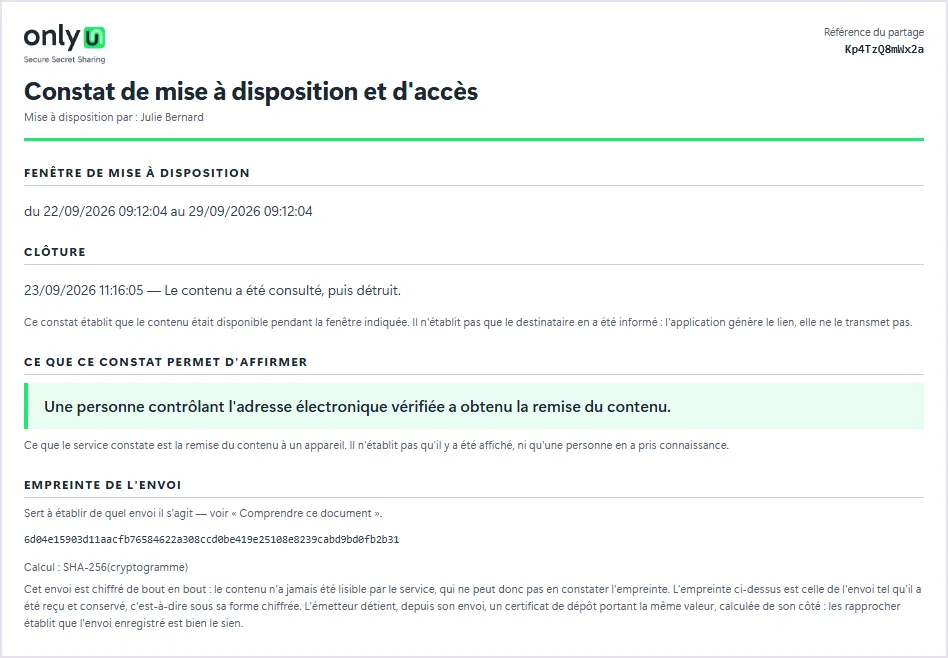
A contract to review, an access code, a rental file, a supporting document: when a transmission matters, it can happen that it is disputed. The recipient claims not to have received anything, or to have received something else, or to have received it too late.
Usual methods handle this situation poorly:
What is missing is an account of the facts kept by someone other than you, and that can be verified without having to take your word for it. That is the role of the proof.
When you share a message or document with OnlyU, the service does not read its content: it is encrypted on your device before it leaves. However, it carefully notes everything that happens to the share:
Each of these facts is entered in a register that never changes: lines are added in sequence, none are erased.
The proof is the record of these facts, given to the person who made the share. It is drawn up once the share is complete — content accessed, time limit reached or share deleted — because that is the only moment when the story is complete: there is nothing more to add to it.
You will find it in your client area, under My proofs. Depending on your plan, it can be downloaded as an archive containing two files:
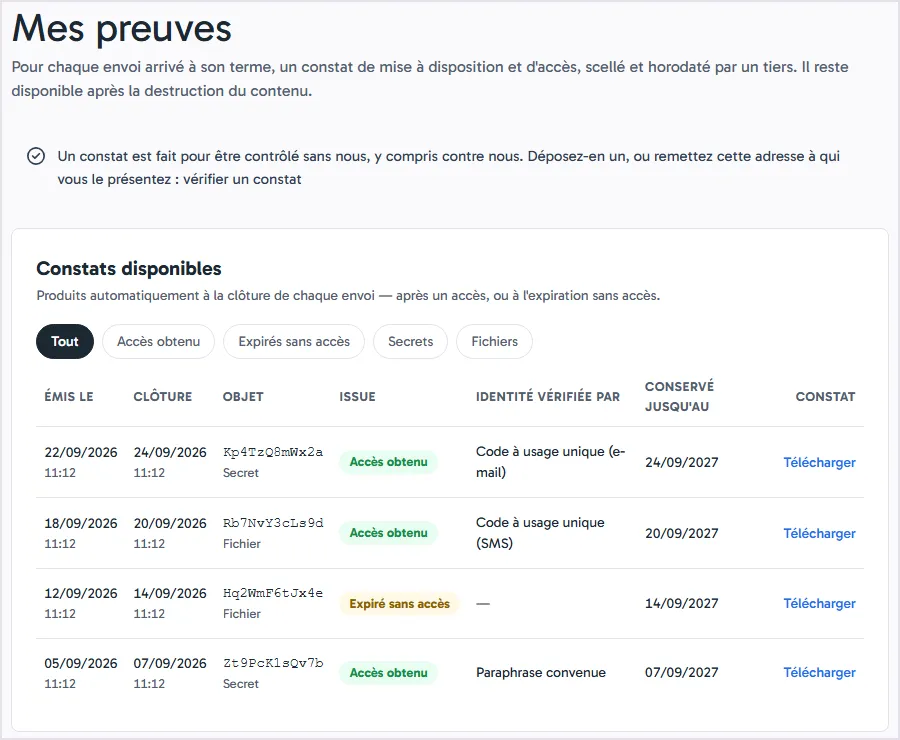
Keep both together: one is read, the other is verified. The proof is kept for a duration that depends on your plan; download it before it expires if you think you might need it later.
The document reads from top to bottom, like a report:
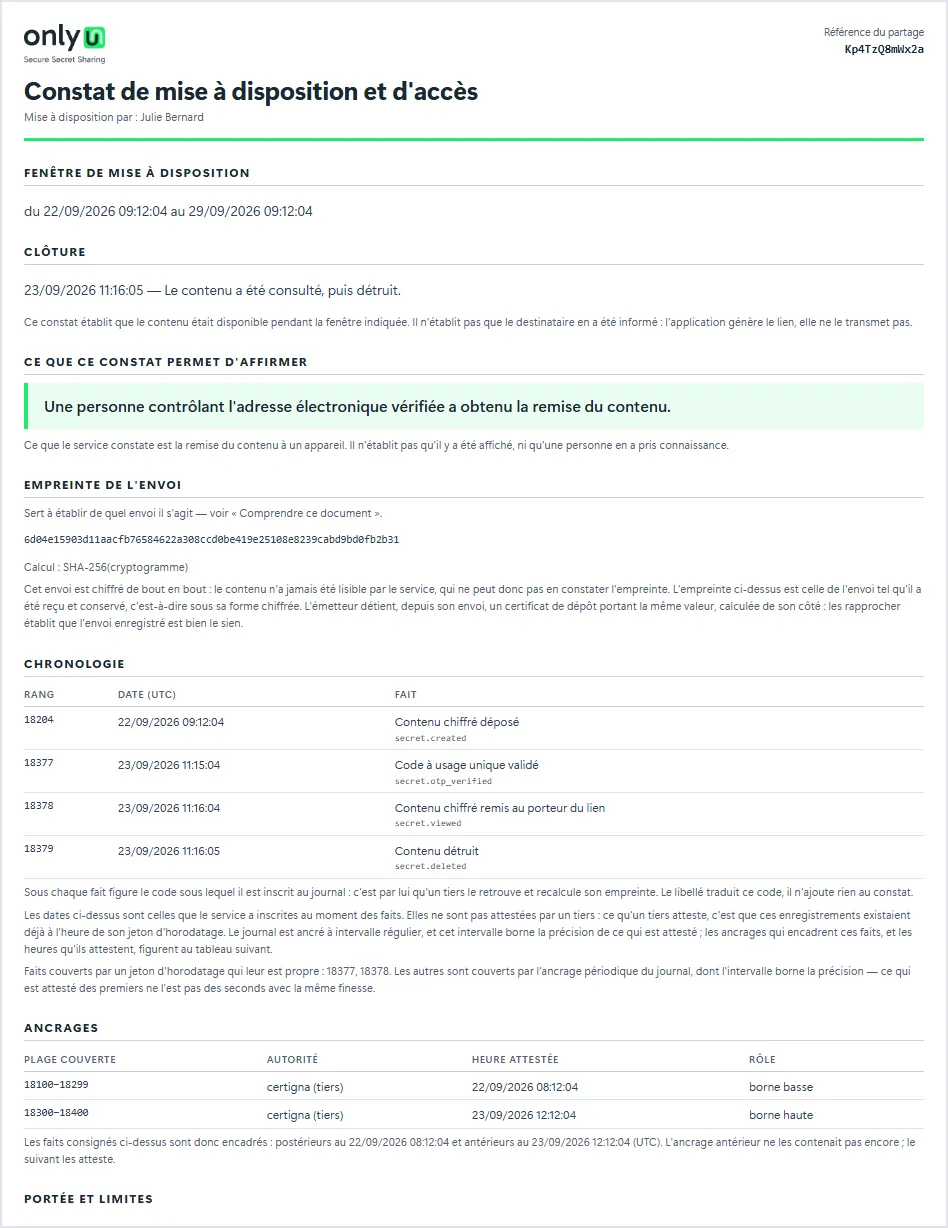
The proof always says how the share ended. This is often the most useful information.
The proof indicates when the content was delivered, and after what verification if you had requested one.
The content remained available from the first to the last day, and no one obtained it.
The content was delivered, then remained accessible until the end of the chosen time period.
The share was deleted before the scheduled end; the proof states on what date and under what circumstances.
A "no access" proof is information in its own right: it shows that the content was at the recipient's disposal throughout the period. It does not say, however, that the recipient had received the link — it is up to you to be able to establish that you transmitted it to them.
A link alone works like a key: the service records that it was presented, not who held it. The protections you add when sharing change what the proof can assert.
The proof establishes that the content was delivered to the person who held the link.
The content could only be opened with a secret agreed between you, outside the service. Excellent protection; but OnlyU never sees this phrase, and the proof therefore cannot say that it was correctly provided.
A code is sent by email or SMS to the destination you indicated, and the service records its validation. The proof can then assert that the content was delivered to a person who controlled that address or number.
The two protections accumulate. For security, the secret phrase is the most solid; for proof, it is the one-time code that adds the most, because its validation leaves a trace that the service can record.
A proof document is only credible if it is precise about what it establishes. The proof therefore writes its own limits:
A document produced by a service provider could, in theory, have been altered. The proof is built so that this question does not arise:
For verifications, the verification page recalculates the fingerprints directly in your browser, and a standalone verification program, whose method is published, is authoritative for verification intended for a third party. The second guide, on the deposit archive, shows how to use it.
The proof is the record of your share, kept by the service and verifiable by a third party. It allows you to show:
To use it when the time comes: download it from My proofs, and also keep the deposit archive that you receive on the end-of-send screen.